StacksAtlas
Discover every device on your network for free. Upgrade when you need always-on history, alerts, and fleet.
Discover your whole network in a session. No license key, no device limit, no masked rows. Business adds a persistent appliance on your NAS, server, or Windows service with unlimited discovery, no cloud account, no subscription.
Network visibility in seconds, on any environment
Discover devices, map how they connect, assess risk, and produce reports. Free portable for session scanning. Business for always-on persistence, alerts, and Hub.
Build a complete picture of every device on the network.
Ready to evaluate
Download the free portable app, preview the interactive demo, or read the documentation. Same product experience from a single site to a federated fleet.
Preview the product UI
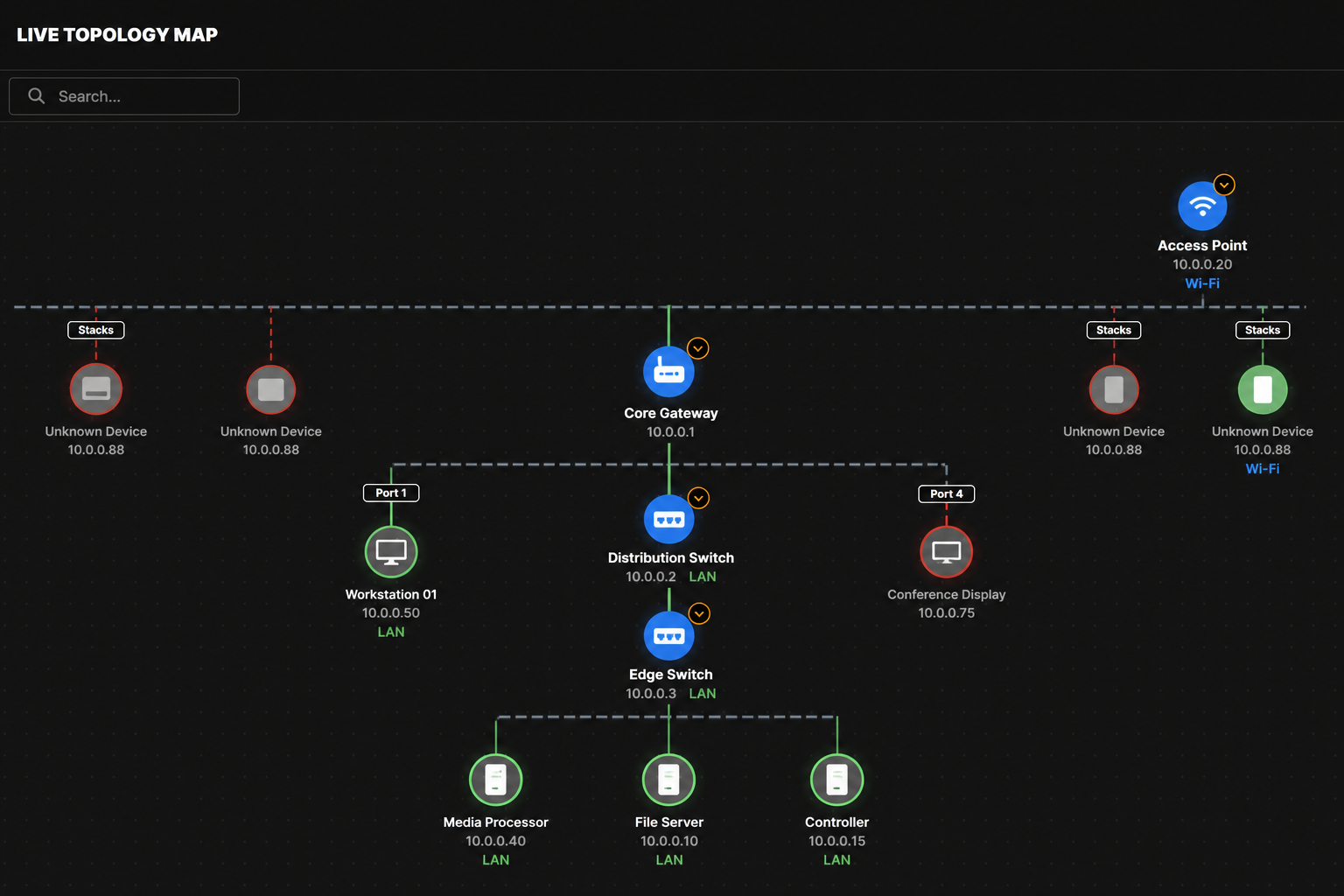
Explore a sample inventory, security grades, alerts, and a simplified topology map in your browser. A lightweight preview of the appliance experience, not every feature.
Sample data only · no download required
Loading interactive demo…
Trusted by Early Adopters
“StacksAtlas has been an excellent addition to my toolkit for troubleshooting complex networks like our church’s Dante system. The installation is smooth, and the ability to quickly identify and monitor 50+ devices on a subnet has been invaluable. It’s rare to find a developer so responsive to real-world feedback.”
Daniel DeLaTorre
Beta Tester & Early Adopter
Download Free Portable
Unlimited discovery on every tier. Upgrade when you need data that survives reboots and a team dashboard, not to unlock more devices in the scan.
Signed builds from releases.stacksatlas.com. Verify the Authenticode / notarization prompt on first launch.
Optional: Register free via Lemon Squeezy to get release updates by email.
Simple, Transparent Pricing
Unlimited discovery on every tier. Pay per appliance, not per device.
$0
Open-source MIT session scanner
Open-source MIT core on GitHub
Unlimited device discovery, no cap
Windows portable (.exe), macOS DMG, Docker portable
Security grades & structured audit findings
PDF & CSV reports for the session
No license key required
$40
One-time perpetual license
Persistent database & scan history
Always-on background service (MSI, Mac Install, Docker)
Alerts, webhooks, multi-user RBAC & SSO
Hub mode & multi-site federation
One license key per appliance (Hub and each site)
Tailscale federation for remote sites
Unlimited discovery, same as free tier
Where can I run it?
Two ways to run StacksAtlas. Free means download, scan, and leave when you are done. Business means install it so it keeps watching in the background on a PC, Mac, or NAS.
| How you run it | Free | Business |
|---|---|---|
Windows: download and run (no install) | ||
macOS: download and run (no install) | ||
Docker / Linux: try for a session | ||
Windows: install as always-on service | ||
macOS: install as always-on background app | ||
Docker / NAS: always-on appliance |
Frequently Asked Questions
Setup, licensing, platforms, and common network questions.
You can inspect the source code, build it yourself, or contribute OUI fingerprints and device profiles. The commercial Business appliance adds persistent multi-site Hub federation, SSO, and automated installer services for always-on enterprise deployments.
Business ($40, one-time) is the full always-on appliance: Windows MSI service, macOS Install daemon, or Docker with a persistent database. Adds real-time alerts, webhooks, SSO, Hub mode, and Tailscale federation. One license per machine (Hub and each enrolled site). Discovery stays unlimited; you pay per appliance, not per device.
Compare tiers in the docs →
Portable vs Business in the docs →
docker-compose.portable.yml from the repo for a free session scanner (no license key). Open http://127.0.0.1:5000 on the host (Linux/Docker). macOS portable uses http://127.0.0.1:5050. When finished, run docker compose -f docker-compose.portable.yml down -v to remove session data.For an always-on NAS or Linux server with persistence, alerts, and federation, use the standard
docker-compose.yml with a Business license. Docker setup guide →Business (leave it running): Windows service install, macOS always-on install, or Docker/NAS appliance.
See Where can I run it? under pricing, or the installation docs →.
- Windows & Docker:
http://127.0.0.1:5000 - macOS:
http://127.0.0.1:5050(macOS reserves port 5000 for AirPlay)
Licensing & activation guide →
License & privacy summary →
Step-by-step Hub & fleet guide →
- Try free: Download portable and scan your network.
- Buy: Purchase Business from the pricing section. Your license key arrives by email.
- Install: MSI, Mac Install app, or Docker appliance. Activate in Settings → Licensing.
- Optional: Enable Hub mode and enroll remote nodes.
Full setup guide →
Full requirements table →
Troubleshooting guide →
If macOS still blocks launch (rare browser quarantine), right-click StacksAtlas.app → Open once. For free portable, run StacksAtlas.app only, not Install StacksAtlas.app (Business always-on). Session data lives in
~/StacksAtlas-Trial until you choose Close & remove portable data./api-docs (Swagger UI) after install. Use it for custom scripts, the OpenAVC Control Bridge, and automation. Integration recipes →Why StacksAtlas?
On-prem discovery and monitoring without enterprise contracts or maintaining your own scripts.
Swipe horizontally to compare all columns| Feature | StacksAtlas | DIY scripts | Enterprise NMS |
|---|---|---|---|
| Setup time | Minutes | Hours to days | Weeks |
| Open source core | |||
| Cost | Free portable · $40 Business | Free (+ your time) | $$$$/year |
| Try without buying | Trial or sales call | ||
| Auto-discovery | |||
| Security grades | Varies | ||
| Device discovery limits | Unlimited (all tiers) | You define | License-dependent |
| Persistent history | Business | If you build it | |
| Real-time alerts | Business | Custom code | |
| No cloud required | |||
| Ongoing maintenance | Minimal | You own it | Vendor + renewals |
Help & Documentation
StacksAtlas is self-hosted: start with the docs and troubleshooting guide. No support desk or guaranteed response time. Email is for licensing and critical issues only.
Development pause: Product and site development is frozen as of July 13, 2026. The public changelog is the record of what shipped (homelab and preview trains included). Security and critical fixes may ship as patch releases only.